CI/CD
The CI/CD infrastructure for Polykey projects is all managed on GitLab.
Setting up Gitlab CI/CD Mirror
Open source GitHub repositories are mirrored to https://gitlab.com/MatrixAI/open-source in order to execute the CI/CD.
To setup a mirror:
- Assume a GitHub repository exists.
- Create a repository on GitLab under https://gitlab.com/MatrixAI/open-source.
- Go to the repository settings and remove the default mirrored repository and
add a new pull mirror:
- Use the
https://path to the GitHub repository. - If the repository is private on GitHub, you will need to use an access
token that is part of
MatrixAI-Bot. Do not use your personal access token. The username will beMatrixAI-Bot. - Enable
Overwrite diverged branches. - Enable
Trigger pipelines for mirror updates. - Mirror specific branches:
master|staging|feature.*(this is a regular expression).
- Use the
- Under
Protected branchesandProtectedtags:- Protect branches
master,staging,feature*. - Protect tags
v*,prerelease*,release*. - Only maintainers should be allowed to push and merge.
- Only
feature*is allowed to be force pushed.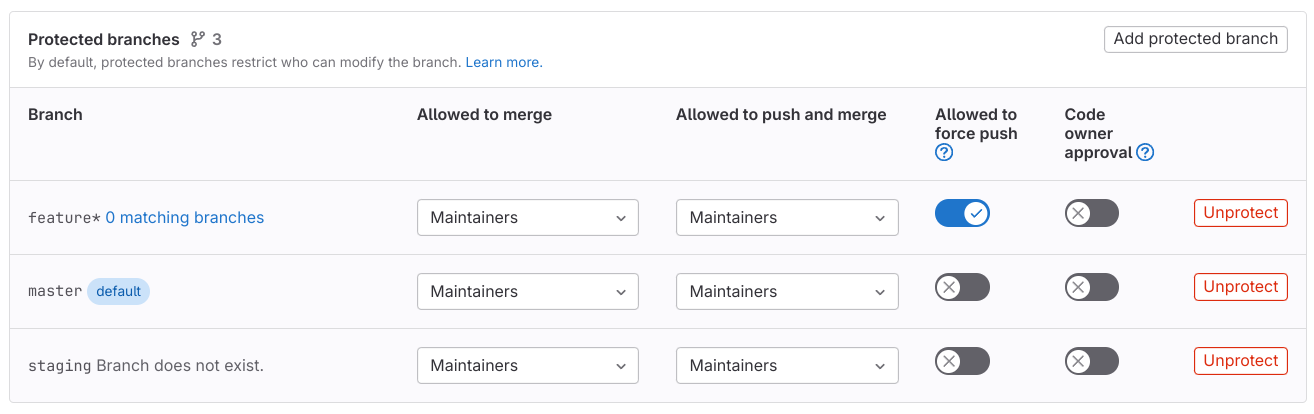
- Protect branches
- Under the CI/CD variables, add in the relevant variables required to execute
the
.gitlab-ci.yml. - Under
Integrations:- Enable
GitHubas an integration. - Provide a commit status token.
- Enter the relevant repository URL.
- Enable
static status check names.
- Enable
- Ensure the default branch matches the default branch on GitHub. Usually this
is
stagingfor both.
You should see CI/CD jobs execute under the Pipelines, and the status of these
appear in the GitHub status.

On GitHub add the pipeline status badges to show the status of the CI/CD on GitLab. As an example, the below is the markdown excerpt for https://github.com/MatrixAI/Polykey.
staging:[](https://gitlab.com/MatrixAI/open-source/Polykey/commits/staging)
master:[](https://gitlab.com/MatrixAI/open-source/Polykey/commits/master)
staging: master:
This allows us to communicate to others that the CI/CD runs on GitLab.